Figma ai ui ux web Development 2026
Discover how Figma AI, Figma Make, Figma Agent, Figma Weave and AI-powered workflows are changing UI/UX design and web development in 2026.
Figma AI in 2026: How AI + UI/UX Is Changing Web Design and Development
By: Bharat Zalavadiya | Category: Figma, AI, UI/UX & Web Development
Introduction: Figma Is Entering a New Era
For years, Figma has been one of the most important tools for collaborative UI/UX design. Designers use it for wireframes, prototypes, high-fidelity interfaces, components and design systems, while developers use Figma files to understand layouts, spacing, typography, colors and assets before turning designs into production code.
In 2026, that workflow is changing quickly. Figma is expanding beyond the traditional design canvas with AI-assisted capabilities covering design exploration, app creation, visual creation, motion, agents and code-oriented workflows.
Figma reported $370.1 million in Q2 2026 revenue, up 48% year over year, and highlighted continued AI adoption while raising its full-year revenue outlook. This makes the company's AI direction more than a simple feature experiment; it is becoming part of Figma's broader product strategy.
The bigger question is therefore not whether AI will appear in design tools. It already has. The important question is how designers and developers should work differently because of it.
What Is Figma AI?
Figma AI is best understood as a collection of AI-powered capabilities across the Figma ecosystem rather than one single feature. Figma's AI direction includes capabilities such as Figma Agent, Figma Make, AI-assisted design workflows, Figma Weave and generative tools.
Figma's documentation describes Figma Agent as a conversational AI capability that can help users generate and remix designs, automate repetitive work and provide design feedback. Figma Make is positioned as a prompt-to-app tool that can turn ideas and existing designs into functional experiences.
The important shift is that AI can participate throughout the product workflow:
Idea → Design → Prototype → Code → Test → Refine → ProductionAI can accelerate several steps in that chain, while human expertise remains responsible for product decisions, UX quality, accessibility, architecture and production readiness.
Why Figma's AI Strategy Matters
Almost every major creative software platform is adding AI. Figma's approach is interesting because AI is being placed directly inside the design and product-development environment.
At Config 2026, Figma highlighted developments including Figma Motion, Figma Weave, the Figma agent, generative plugins, shaders and Code Layers. Together, these capabilities point toward a broader product-building environment where design, visual creation, interaction and code can work closer together.
For professionals, this can reduce the friction between different stages of a project. Instead of moving repeatedly between a design application, image tool, animation application, code editor and prototype tool, more of the workflow can happen around a shared design context.
Figma Agent: An AI Design Collaborator
One of the most interesting parts of Figma's AI strategy is the Figma agent. Rather than treating AI as a separate chatbot, Figma is bringing conversational assistance into the design workflow.
A designer can use an AI assistant to explore layouts, remix ideas, automate repetitive actions or receive feedback. Figma also describes capabilities that can use web search, attached files and supported external connections through MCP connectors.
This changes the workflow from simply asking AI to generate a design to asking AI to work with the context of an existing design system, project and file.
For example, instead of saying:
"Design a modern SaaS dashboard."
a stronger instruction could describe the product, users, responsive requirements, existing components, brand constraints and desired interaction patterns.
The resulting design still requires human review. A professional designer must evaluate information architecture, hierarchy, usability, accessibility, responsive behavior, brand consistency and interaction quality.
Figma Make: From Prompt to Functional Experience
Figma Make is particularly interesting for developers because it brings design and functional prototyping closer together. Figma describes Make as a prompt-to-app tool that can bring ideas and existing Figma designs to life.
A traditional workflow often looks like this:
Idea
 ↓
Wireframe
 ↓
Figma Design
 ↓
Developer Handoff
 ↓
React / Next.js
 ↓
Testing
 ↓
Production
An AI-assisted workflow can look more like:
Idea
 ↓
Prompt
 ↓
Figma Design
 ↓
Figma Make
 ↓
Functional Prototype
 ↓
Developer Refinement
 ↓
Production
The second approach can shorten the distance between an idea and an interactive prototype. However, generated output should not automatically be treated as production-ready code.
Developers still need to review architecture, accessibility, responsive behavior, performance, API integration, security, error handling, SEO and maintainability.
Figma + React + Next.js
For frontend developers, the most valuable opportunity may be connecting Figma's AI capabilities with modern development frameworks such as React and Next.js.
Step 1: Define the Product
Start with the business requirements, users, goals, pages, features and technical constraints.
Step 2: Generate Initial UI Directions
Use AI to explore multiple visual and structural directions before committing to one.
Step 3: Establish a Design System
Define colors, typography, spacing, grids, buttons, forms, cards, navigation, tables and component states.
Step 4: Prototype
Create interactions and responsive states so the intended behavior is clear.
Step 5: Use Figma Make
Turn the design concept into a functional prototype where appropriate.
Step 6: Build the Production Application
Move toward React, Next.js or another appropriate technology stack.
Step 7: Refine the Generated Output
Clean up components, state management, APIs, accessibility, SEO, performance, error handling and responsive behavior.
Step 8: Deploy and Measure
Ship the application, monitor real-world behavior and continue improving it.
AI Is Not Replacing UI/UX Designers
One of the biggest misconceptions about AI design tools is that generating a visually attractive screen is equivalent to solving a UX problem.
AI can generate layouts, components, content, images, prototypes and code. But product design still requires understanding why a screen exists, who uses it, what action the user should take, what happens when data is missing and how the interface behaves when something goes wrong.
Real UX includes questions such as:
- What is the user's primary goal?
- What should the user see first?
- What happens when there is no data?
- What happens when an API fails?
- How does the interface work on mobile?
- Can keyboard users navigate it?
- Does the visual hierarchy support the business goal?
AI can help answer these questions, but human product judgment remains essential.
Why Design Systems Become More Important With AI
AI can generate many interface variations quickly. That makes consistency more important, not less.
Without a design system, AI-assisted work can create multiple button styles, inconsistent spacing, different border radiuses, random typography and conflicting component patterns.
A design system gives AI and humans a set of rules to work within.
Primary Color
#C00000Spacing
4 / 8 / 12 / 16 / 24 / 32 / 48
Radius
8 / 12 / 16
Typography
H1
H2
H3
Body
Caption
When AI operates within these constraints, generated work becomes much easier to review and maintain.
Figma Variables + AI
Variables are another important part of structured Figma workflows. They can represent colors, spacing, dimensions, themes and other reusable values.
Instead of asking AI to invent values every time, a team can establish tokens and components first. The workflow becomes:
Prompt → Existing Design System → Component → Consistent UIThis is considerably more useful than simply asking an AI tool to "make a beautiful website."
Figma Weave and AI-Powered Visual Creation
Figma Weave expands the AI story beyond interface design. Figma describes Weave as a creative platform covering AI-assisted visual workflows across image, video, animation, motion design and VFX.
For UI designers, this can be valuable because visual asset creation is often a separate stage of the workflow. AI-assisted image variations, background changes, product visuals and other asset tasks can happen closer to the design environment.
The practical advantage is less context switching and a more connected creative workflow.
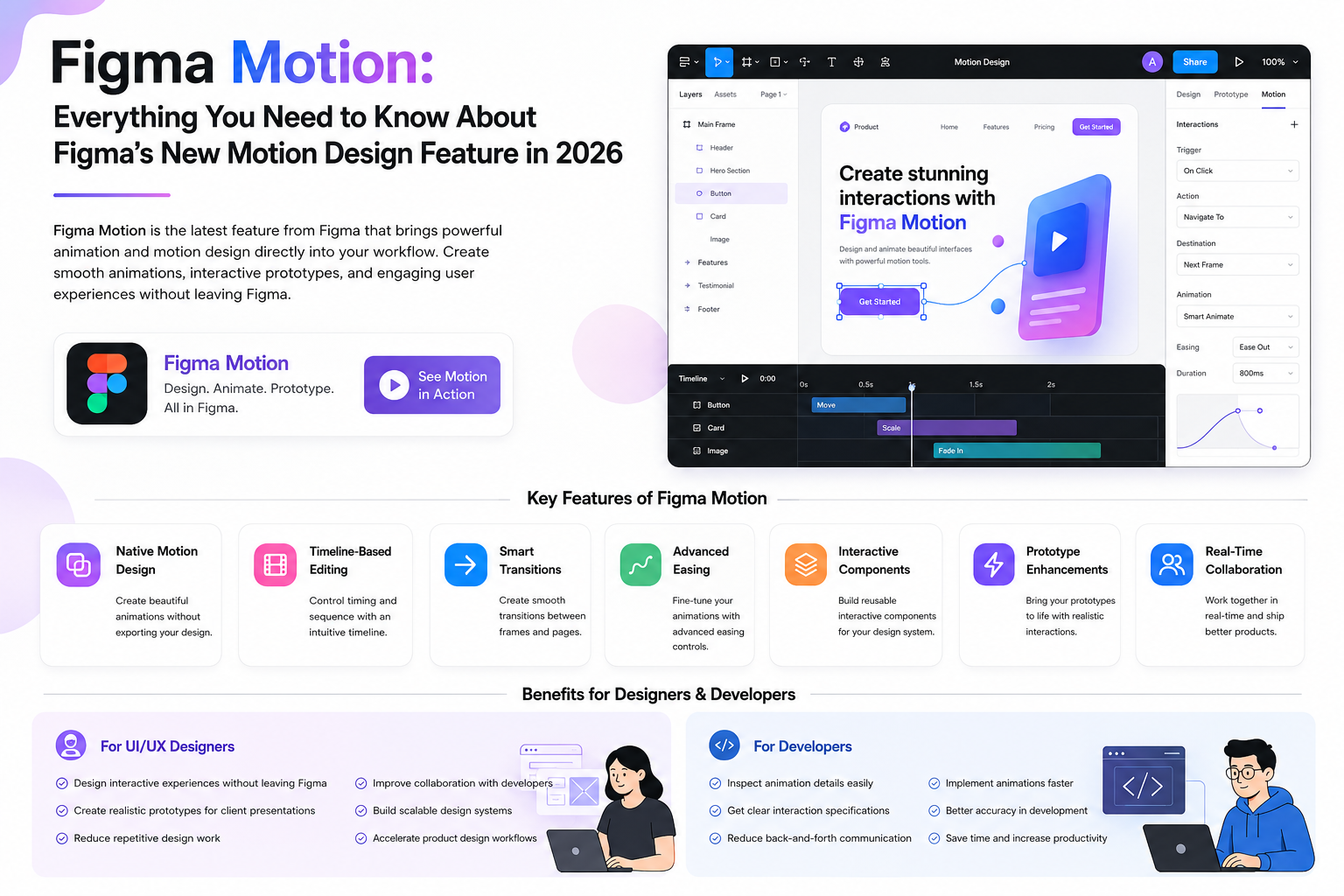
Figma Motion
Figma is also expanding into motion design. Figma Motion was introduced at Config 2026 and is designed to let designers create animations directly within Figma. Figma says the feature began rolling out as an open beta in June 2026.
Motion is increasingly important in modern interfaces. Examples include:
- Button interactions
- Page transitions
- Loading states
- Micro-interactions
- Modal transitions
- Product demonstrations
- Scroll-based animations
A static screenshot communicates appearance. Motion communicates behavior. That makes motion-aware prototypes more useful for design-to-development collaboration.
Figma Motion and AI Prototyping
Imagine a landing page prototype with a hero animation, product transition, animated CTA, scroll behavior and mobile-specific interactions. A richer prototype makes the intended final experience much clearer.
For developers, this reduces ambiguity. Instead of guessing how an interaction should behave from a static screenshot, the prototype can demonstrate the intended behavior.
Code Layers and the Design-Code Boundary
Figma's Config 2026 announcements also included Code Layers, described as a way to design with code directly on the Figma canvas. Figma lists Code Layers as a closed-beta capability.
The significance is not simply that designers will write more code. The bigger idea is that design and implementation can become less isolated.
Designer → Figma
Developer → Code Editor
can gradually become a more connected model:
Design Context ↔ Code Context ↔ Product ContextThis can improve collaboration without requiring every designer to become a full-stack engineer.
Figma MCP and Developer Workflows
Model Context Protocol, commonly known as MCP, is another important part of the evolving design-to-development workflow. Figma describes MCP-based connections that can help move context between Figma and external tools.
The potential benefit is better context. Developers may spend less time manually explaining every design token, component state and layout rule when tools can access structured design information.
The long-term goal is therefore not simply "Figma to code." It is better described as:
Design Context → Development ContextFigma AI + WordPress
This workflow is particularly relevant for WordPress developers. A client might need a modern industrial, corporate, ecommerce or service-based website.
A structured workflow can start in Figma with the homepage, about page, services, product pages, contact page, blog and responsive layouts. Once the design system is established, development can move into WordPress using a custom theme, Gutenberg, Elementor, ACF, custom post types or WooCommerce depending on the project.
AI can accelerate content structures, CSS, JavaScript, PHP snippets, documentation, SEO metadata and implementation ideas. But production WordPress work still requires security, performance, plugin compatibility, accessibility, maintainability and testing.
Why AI + UI/UX Skills Could Become More Valuable
The future is unlikely to be simply "designer versus AI" or "developer versus AI." A more useful model is designer plus AI and developer plus AI.
A designer who understands components, variables, responsive design, accessibility, HTML and CSS can communicate more effectively with developers.
A developer who understands UX, typography, layout, interaction and design systems can implement better interfaces.
AI increases the value of that cross-functional knowledge because people who understand the whole workflow can direct AI more effectively.
Skills UI/UX Designers Should Learn in 2026
- Typography
- Layout and visual hierarchy
- UX research
- Interaction design
- Figma components
- Variables and design tokens
- Design systems
- Responsive design
- Accessibility
- Prototyping and motion
- Figma AI workflows
- Basic HTML and CSS
- Basic frontend concepts
Skills Developers Should Learn
Developers who want to improve their design-to-code workflow should learn Figma fundamentals alongside their existing technical skills.
- Figma and Dev Mode
- Auto Layout
- Components and variants
- Variables
- Design systems
- Responsive UI
- UX fundamentals
- Accessibility
- React
- Next.js
- TypeScript
- Git
- Testing
- Performance optimization
- SEO
The Biggest Mistake: Trusting AI Output Blindly
AI-generated UI can look impressive while still being unsuitable for production.
Responsive Design
Test layouts at small mobile widths, tablets, laptops and large desktop screens. A design that looks good at 1440px can still fail at 320px.
Accessibility
Check contrast, keyboard navigation, focus states, semantic HTML and screen-reader behavior.
Performance
Review JavaScript size, images, fonts, animations and Core Web Vitals.
SEO
Review headings, metadata, internal links, structured data and crawlability.
Code Quality
Review reusable components, naming, state management, error handling, security and maintainability.
AI is fast. Professional review needs to be faster and smarter.
Is Figma Becoming a Developer Tool?
Figma remains a design and product-development platform, but the boundary between design and development is becoming less rigid.
The direction is increasingly:
Design + AI + Code + Assets + Prototype + CollaborationFigma's AI strategy describes an end-to-end workflow in which teams can explore, refine and ship with AI agents and code-oriented capabilities.
Developers do not necessarily need to become expert visual designers. However, understanding where the design-to-code workflow is going can make collaboration much more efficient.
What Figma's 2026 Growth Means
Figma's Q2 2026 financial results provide an interesting business signal. Revenue reached $370.1 million, up 48% year over year. Figma also reported its first full quarter of AI credit monetization and highlighted expansion through seats and AI credit add-ons.
Strong financial performance does not guarantee that every AI feature will succeed. However, it demonstrates that AI is becoming commercially important to Figma's strategy.
For designers and developers, learning these workflows can therefore be a practical career investment rather than simply following a short-term trend.
The Future Workflow: Designer + Developer + AI
The future is more likely to look like collaboration than replacement.
Human Idea
     ↓
AI Exploration
     ↓
Designer Judgment
     ↓
Design System
     ↓
Prototype
     ↓
AI-Assisted Development
     ↓
Developer Review
     ↓
Testing
     ↓
Production
Humans remain responsible for the important decisions. AI accelerates execution and exploration.
My Figma AI Workflow for 2026
Phase 1 — Strategy
Define the business goal, target users, primary conversion, pages, content and technical requirements.
Phase 2 — UX
Create the sitemap, user flows, wireframes and content hierarchy.
Phase 3 — UI
Build design tokens, variables, components, responsive layouts and the design system.
Phase 4 — AI Exploration
Use Figma AI and the agent for exploration, variations, repetitive tasks and feedback.
Phase 5 — Prototype
Use interactions, motion and realistic content to validate the experience.
Phase 6 — Development
Move toward React, Next.js, WordPress or another suitable production stack.
Phase 7 — Optimization
Check performance, accessibility, SEO, mobile behavior, security and UX.
Phase 8 — Launch
Deploy, measure real-world behavior and continue improving the product.
Final Thoughts
Figma's 2026 strategy is a strong signal that the future of digital product creation will increasingly connect AI, design, code and collaboration.
The company's latest product direction includes Figma Agent, Make, Weave, Motion, generative plugins and code-oriented capabilities. Its Q2 2026 results also show strong growth and increasing AI adoption.
For designers and developers, the takeaway is simple:
Don't compete with AI. Learn how to work with it.
A designer who can use AI but does not understand UX will still struggle. A developer who can generate code but does not understand architecture will still struggle.
The stronger combination is AI + design systems + UX + development + business understanding.
Figma is moving beyond being only a canvas. AI is moving beyond being only a chatbot. The modern product workflow is moving toward a place where ideas, design, code and AI can exist much closer together.
The professionals who learn that workflow early can build products faster while still maintaining the quality, accessibility and technical standards that production software requires.
Frequently Asked Questions
What is Figma AI?
Figma AI refers to a collection of AI-powered capabilities across the Figma ecosystem, including Figma Agent, Figma Make and other AI-assisted workflows.
What is Figma Make?
Figma Make is a prompt-to-app tool that helps users turn ideas and existing Figma designs into functional experiences.
What is the Figma Agent?
Figma Agent is a conversational AI capability inside Figma that can help generate and remix designs, automate tasks and provide feedback.
What is Figma Weave?
Figma Weave is Figma's AI-powered creative platform for visual workflows including image, video, animation, motion design and VFX.
Is Figma AI replacing UI/UX designers?
No. AI can accelerate exploration and repetitive work, but UX strategy, accessibility, usability, product context and design judgment remain important human responsibilities.
Can Figma AI generate React or Next.js websites?
AI-assisted Figma workflows can help move designs toward functional experiences and code-backed prototypes. Production applications still require developer review, architecture, testing and optimization.
Should WordPress developers learn Figma AI?
Yes. Understanding Figma's AI workflow can improve design-to-development collaboration and speed up early-stage implementation for custom WordPress projects.
Is AI UI/UX a good skill to learn in 2026?
Yes, provided AI is learned alongside fundamental UI/UX principles, responsive design, accessibility, design systems and development knowledge.
Key Takeaway
The future isn't AI versus designers or AI versus developers. The advantage belongs to people who know how to combine AI with real design and development expertise.
A powerful 2026 skill combination is:
Figma + AI + Design Systems + UI/UX + React/Next.js + WordPress
That combination can take a project from idea → design → prototype → code → production much faster.